DeCA module for Caotic · live since 8 September 2026

From 5 October, no lorry leaves without its DeCA.

In Spain, the road transport control document becomes electronic and downloadable through a QR code. Caotic generates it before departure, publishes it and prints the QR code for you, from the same dispatch screen as always. You do not change systems or install anything.
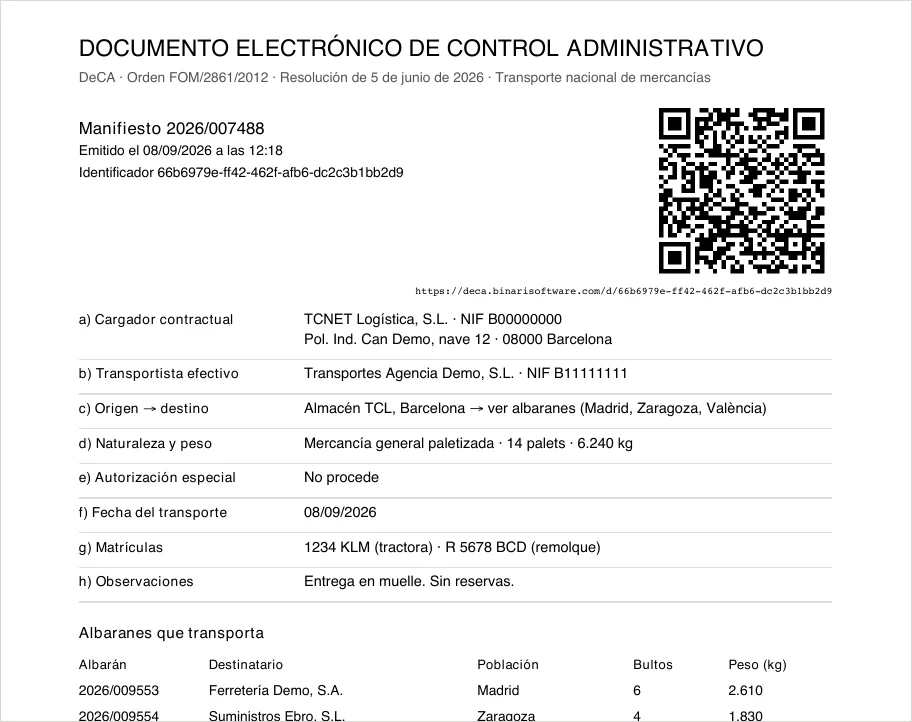
Electronic administrative control document generated by Caotic: manifest 2026/007488 with QR code, shipper, carrier, origin and destination, goods, date, number plates and delivery notes.
DeCA · issued by Caoticdemo data
01

The essentials

Every road transport of goods in Spain must carry a control document. Until now it was a piece of paper. From 5 October 2026 it has to be a PDF with a QR code that an inspector can download on the road, without credentials. It is mandatory, it has a date and it affects every departure from your warehouse.

What changes

The document before departure

It must exist before the lorry leaves, generated from data and with the creation date embedded. Paper remains, but only as a carrier for the QR code.

Who is liable

The shipper and the carrier

The contractual shipper and the actual carrier. If your warehouse contracts the transport, the obligation is yours. It cannot be left to “the lorry will sort it out”.

What Caotic does

Generates, publishes and prints

It composes the document with the data it already has in the manifest, publishes it on Binari’s DeCA service and prints the QR code for you. One more document in the usual dispatch.

02

How it works

Three steps. Caotic does the first two on its own; the inspector does the third with their phone.

01 · Before departure

Caotic generates the DeCA

With the manifest data it composes the PDF of the control document, with the creation date embedded and the QR code inside.

02 · In seconds

It publishes it and prints the QR code

The document is stored on Binari’s DeCA service. Only once it is confirmed does Caotic print: a lorry never leaves with a QR code that does not work.

03 · On the road

The inspector scans and downloads

The driver shows the paper or the phone. The inspector scans the QR code and the PDF opens on their phone, with no user or password.

Your dispatch team
The same screen as always. When dispatch is closed, Caotic generates the DeCA and publishes it; if everything is fine, it prints the document with the QR code. With no connection, it warns and does not print until publication is confirmed.
The driver
A document with the transport data and a QR code. Carried on paper, like today’s manifest, or on the phone.
The inspector
Scans the QR code with their phone and downloads the PDF with the date and time of issue embedded. Exactly what the regulation asks them to check.
03

Changes during transport

A lorry breaks down and another one carries on with the load. The regulation requires the change of vehicle to be recorded in the control document (art. 6 g of Order FOM/2861/2012), and a handwritten note on the printed copy is not valid (Resolution of 5 June 2026, section seven). With Binari’s DeCA service, the carrier records it on the spot: the driver does it from their phone, without anyone at the office having to step in.

01 · From the phone

The driver opens the link

The document downloaded through the QR code carries a “Modificar este documento” (modify this document) link. It opens a very short form on the phone, already filled in with the document’s data: the date of the service, the actual carrier, the vehicle and trailer number plates and the driver with their ID number (DNI or NIE). The driver corrects whatever changes and gives the reason and their own name. One button.

02 · In the same PDF

The service records the change

A stamp at the top of the first page states that the document has been modified and that the replaced data is no longer valid. A final “Modificaciones” (modifications) page is added with the new value, the one it replaces, the reason, who made the change and when.

03 · On the road

The QR code stays the same

Neither the QR code nor the address changes: an inspector who scans it downloads the updated document. The creation date of the PDF, which proves it was issued before departure, is not touched.

04 · At the office

Your company is notified

An email to the addresses you have configured: what changed, who, when and why, with the modified PDF attached and a link to the document’s history. With that notice, you update the data in your own system.

What can be changed
The date the service is carried out, the actual carrier and its details, the vehicle and trailer number plates and the driver with their ID number (DNI or NIE). Which fields apply is configured for each customer, to match their document. No comments or free text.
How it is recorded
Using the first method set out in the Resolution of 5 June 2026 (section five): the new data and the reason are added to the same PDF, the previous data is kept and marked as no longer valid, and neither the address nor the QR code changes.
History
Every document has a history page showing its issue and each modification. Everything is recorded and nothing is deleted.
Activation
It is activated customer by customer: when each one is set up, we define whether their documents can be modified, which fields, and which email addresses receive the notices.
04

What the law requires

The control document has existed since 2013. What is new is the form: Spanish Law 9/2025 requires it to be electronic from 5 October 2026, and the Resolution of 5 June 2026 sets how the file, the QR code and the download must work. It applies to domestic transport of goods; the international CMR comes in 2027.

a
Name, tax ID and address of the contractual shipperYour company, or your customer if they contract the transport
b
Name and tax ID of the carrierYour carrier master data
c
Origin and destinationYour warehouse and the consignees of each delivery note
d
Nature and weight of the goodsThe articles and weights in the manifest
e
Special traffic authorisation, if anyAbnormal loads only
f
Date of transportFrom the manifest
g
Vehicle number plate, both if articulatedFrom the manifest
h
Remarks and reservationsFrom the manifest
05

Compliance and security

What the regulation requires and how it is covered, checked against the text published in the Spanish Official Gazette (BOE).

The regulation requires
Document issued before the lorry leavesCaotic generates and publishes it before printing; the date and time of issue are recorded.
The regulation requires
PDF generated from data, with the creation date embeddedCaotic composes it from the manifest and checks it before publishing.
The regulation requires
A QR code with a unique web address for each documentEvery DeCA has its own address, impossible to guess.
The regulation requires
Direct download, no credentials or interactionThe inspector scans and the PDF downloads. Zero clicks.
The regulation requires
Secure connection (HTTPS)Always, with Binari’s own certificate.
The regulation requires
Link available until the end of the transportFifteen days from issue, with margin for any domestic transport.
The regulation requires
Retention of at least one yearEvery document and its record are kept. Nothing is deleted.
The regulation requires
If a document is corrected, keep the originalAll versions are kept and the change is recorded.

Nobody can guess a document

Each DeCA’s address is random. Without the QR code of that specific document there is no way to reach it, and the download link lives for one minute only.

Your space, yours alone

Each warehouse publishes with its own key and its documents live in a separate space, with your name in no address.

In Spain, encrypted

Documents are stored, encrypted, in Amazon Web Services data centres in Spain. They do not leave the European Union.

With a data processing agreement

A DeCA carries names and addresses. Binari keeps them on your behalf under the data processing agreement required by the GDPR, included in the implementation.

06

What you have to do

Not much, and we do it together. Four decisions and one change of habit.

01
Decide who appears as contractual shipper. Whoever contracts the transport: usually your company; sometimes your customer. Their name, tax ID and address go on every document.
02
Complete the tax ID of your carriers. If any is missing from the carrier master data, we add it before going live.
03
Issue before departure. The only change of process: the document is generated when dispatch is closed, not when loading. We adjust it with your team.
04
Always hand a copy to the driver , on paper or on the phone, with the QR code visible. It is what they will show at a roadside check.

What you do not have to do

  • Install programs or servers.
  • Contract anything in the cloud or keep files: the service does it.
  • Report anything to the authorities or register any system.
  • Change your printer, your labels or the way you work at the dock.
07

How to start

The date is fixed: 5 October 2026. From that day on, a lorry that leaves without a DeCA leaves without a control document.

Week 1

Kick-off

Kick-off meeting: contractual shipper, carriers, dispatch process. Service sign-up and test key.

Week 2

Module in your Caotic

First documents in the test space: you scan them and see them on your phone.

Week 3

Process adjustment

With the dispatch team. Data processing agreement.

Go-live

Production key

Every departure carries its DeCA. Binari monitors the service.

A two-minute demonstration

We issue a document in front of you, print it, and you scan the QR code with your own phone. You will see the PDF download without being asked for anything. It is exactly what an inspector sees on the road.

Request the demonstration
08

Frequently asked questions

What if there is no connection when the lorry leaves?
Caotic does not print and warns you; it retries and the document goes out as soon as it is confirmed. This is deliberate: a lorry with a QR code that leads nowhere is worse than none.
What if the inspector has no coverage?
The QR code is a web address, so it needs data on their phone. It is the same for every DeCA of every company, by regulation. The paper still shows the data in plain sight.
How long can it be downloaded?
Fifteen days from issue, more than enough for any domestic transport. Afterwards, the document and its record are kept as evidence.
Can I correct a document already issued?
Yes. It is reissued with the same QR code: the previous version is kept and the correction is recorded.
What if the lorry has to be changed mid-journey?
The driver records it from their phone through the “Modificar este documento” link in the PDF itself: they correct whatever has changed and give the reason and their name. The change is written into the same document, with the same QR code, and your company receives an email with the modified PDF. The date of the service, the actual carrier, the vehicle and trailer plates and the driver with their ID number can be changed, and it is activated customer by customer.
Does it have to be signed?
No. The regulation says so expressly.
Does it replace the CMR or the consignment note?
No. It is the Spanish domestic control document. The international CMR is a different document and its electronic version arrives in 2027.
Who can see my documents?
Only someone holding the QR code of that specific document, and for fifteen days. Addresses cannot be guessed and do not carry your company name.
I have two warehouses.
Each has its own key and space. They can be implemented together or separately.
What if the service does not respond one day?
Binari monitors it and receives an automatic alert. Documents already published are stored separately and protected against deletion.
Do I have to register anywhere?
No. Neither you nor Binari: the regulation does not require reporting anything to the authorities.

Regulatory references: Spanish Law 9/2025 · Order FOM/2861/2012 (BOE-A-2013-154) · Resolution of 5 June 2026 of the Directorate-General for Road and Rail Transport (BOE-A-2026-12784). Commercial explanation; it does not replace legal advice.

DeCA: issue it from the WMS, the ERP or an app? →

Shall we activate DeCA in your Caotic?

If you already use Caotic, activation is a configuration task. If not, we show you the module with your own shipments.

+34 93 866 37 30
Travessia, 14, Sant Feliu de Codines
Monday to Friday, office hours